
NEWS
Google Puts Video Selfie Sign-In on the Homepage
Google is pushing video selfie sign-in on its homepage, while the same stored face clip already feeds age checks, feature gates, and optional model training.

Google has started putting a video selfie prompt on its homepage, asking people to enroll a short face recording as a spare way into their accounts. The clip is optional. Google’s own help pages already list other jobs for that same video, from unlocking features to building an AI avatar. A separate checkbox lets the company use the footage to improve facial recognition and age checks across its products.
The July launch billed the tool as a fallback when a password, passkey, or phone is out of reach. The September homepage card is how that fallback gets turned into a stored face file at internet scale.
Google Put the Prompt on Its Front Door
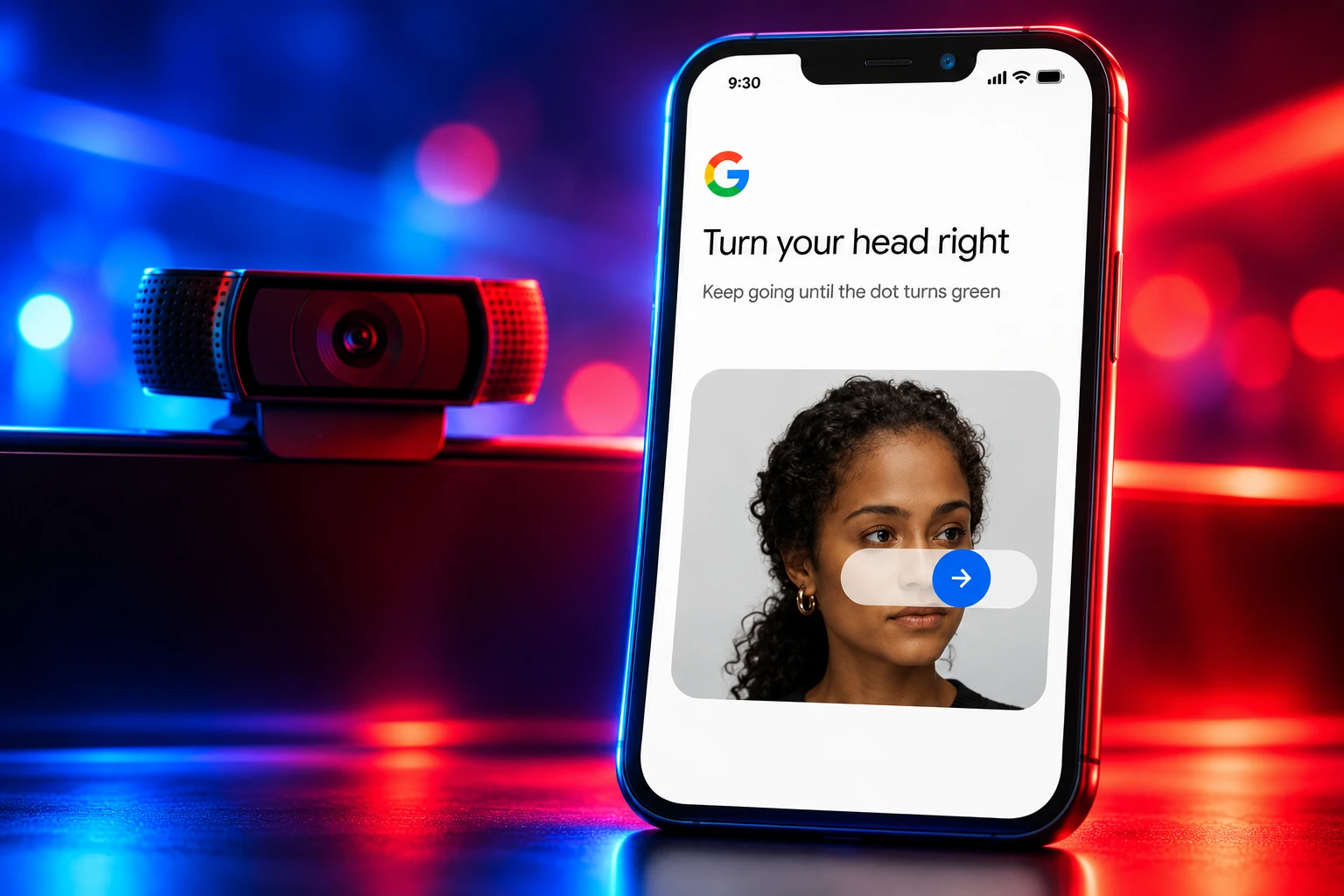
In mid-September 2026, a card appeared on Google’s desktop homepage asking people to sign in with a selfie. The choices are set up selfie and don’t set up. Decline and search still works. Accept and the camera starts a short, guided recording.
John Gronberg, director of product management, and Claire Forszt, product manager for Google Identity and Engagement, introduced selfie video as a new sign-in method on July 23, 2026. They told users to look at a camera, complete a few head movements, and save the clip. If sign-in failed later, another selfie would be matched against that file.
Google’s own account posted the pitch the same day: lost phone, forgotten password, a quick selfie.
Forgot your password? Lost your phone? Can’t get into your account?
You can now use a selfie video to log into your Google Account.
The new feature is easy to use and lets you sign in — even if you forget your password or don’t have your usual phone or laptop — with a quick… pic.twitter.com/3TbdIKLTM9
— Google (@Google) July 23, 2026
About eight weeks later, that optional setting was no longer buried in Security & sign-in. It was sitting under the search box, which is the point of a homepage nudge. You cannot enroll after you are already locked out, so the spare key only exists if Google gets the recording first.
THE SELFIE VIDEO TIMELINE
- July 30, 2025: Google starts U.S. age assurance that can guess whether an account belongs to someone under 18, with a government ID or a selfie as the appeal.
- July 23, 2026: Google launches selfie video sign-in for eligible personal accounts and points people to g.co/signin-selfie.
- Mid-September 2026: A homepage card asks signed-in users to set up that selfie, with a clear way to refuse.
Royal Hansen, vice president of engineering for privacy, safety, and security, framed the launch as innovating beyond passwords after a lost device. The homepage prompt is the enrollment drive that post did not mention.
The Same Clip Already Does Three Other Jobs
Google’s public blog talks almost only about getting back into Gmail, Photos, and Drive. The help article for the feature is wider. It says a short video of you can do three things, and account recovery is only the first.
WHAT GOOGLE SAYS THE VIDEO IS FOR
- Account recovery: A saved selfie is compared with a new recording when you cannot sign in, after you perform a live movement such as turning your head.
- Feature unlocks: Google may ask for a selfie to confirm you are a real person and have not broken its rules before it opens certain tools.
- AI avatars: The same selfie-video system is listed as a way to make an avatar for AI content that looks and sounds like you.
Those are not hidden forum leaks. They sit on the page titled “Take, manage & use a selfie video.” Setup copy goes further still. Google says it will review the recording with a model to decide whether you are a real person who is old enough to use certain Google services. That check runs even if you never tick the extra box about improving Google’s models.
YouTube users are already meeting a cousin of this gate. Creators who complete a selfie check for “advanced features” still get bounced from Studio, which is a reminder that face video is being used as a product lock, not only as a forgotten-password tool.
Why the Video Has to Live on Google’s Servers
A passkey is meant to stay on a device you hold. Forszt said selfie video exists for the case where that device is gone. For the match to work on a new laptop, in a hotel, or on a friend’s phone, Google has to keep the reference clip on its side, tied to the account. The company says the file is recorded with consent and encrypted at rest.
If a computer has no camera, Google shows a QR code so you can finish the capture on a phone. The help page warns that an outdated Chrome build can throw a “Camera unavailable” error. Lighting should be ordinary. Eyes, nose, and mouth must be visible. Sunglasses, masks, and hats are out. Other faces in the room, including a portrait on the wall, can fail the capture.
Google also says you should update the saved clip if your face changes a lot. That is a quiet admission that the spare key is a living biometric file, not a one-time snapshot. Encryption at rest stops a raw file from being lifted out of storage in the clear. It does not change the basic design: Google must be able to open that video and compare it with a new one, or recovery on a strange device would not work.
Selfie is just the newest option in that list available for users. It’s designed to help specifically in these vulnerable scenarios around not having access to the device where your passkey might be.
Claire Forszt, Product Manager, Google Identity and Engagement
Delete the clip and it stops working as a sign-in method. Google says the file is removed from the account after a period of time, and that it may keep the video a little while as a security measure. If it decides you broke a policy, it may keep the selfie longer to enforce the rules. That lag is the gap between “you’re in control” and a face recording that does not vanish the second you tap Delete.
Age Checks Were Already Using Faces
A year before selfie sign-in, Google published age assurance for U.S. kids and teens. Mindy Brooks, vice president for Google Kids and Families, said a model would read signals already on the account, such as search topics and YouTube categories, and decide whether the user looked under 18. People flagged as minors get extra YouTube breaks, no Maps Timeline, no personalized ads, and a block on adult-only Play apps. If the guess is wrong, Google said an adult can upload a government ID or a selfie.
That appeal selfie and the new sign-in selfie are easy to mash together, and they should not be. One is a challenge after an under-18 estimate. The other is a stored spare key sitting in Security settings. The homepage prompt folds the old-enough test into enrollment for the stored key, which is how a recovery tool starts doubling as an age gate.
HOW GOOGLE TREATS TWO FACE CHECKS
| Check | When it appears | What Google says happens next |
|---|---|---|
| Sign-in selfie video | Homepage card or Security & sign-in, before you are locked out | Stored with the account, encrypted at rest, usable later for recovery |
| Age-assurance appeal | After Google estimates an account is under 18 | A government ID or a selfie can correct the age so adult settings return |
| Feature-unlock selfie | A prompt while you are already signed in | Confirms a real person, not a bot; deleting it may close the feature |
The political weather around those checks is not subtle. App stores and social apps are being told to know who is 17 and who is 18, the same teen-safety fight that produced a teen-safety settlement already paid by Meta. Google’s recovery selfie is a convenient on-ramp for a face file it can also run through age models, without asking every user to photograph a driver’s license on day one.
Who Is Left Out of Selfie Sign-In
Google’s help page is blunt: selfie video is not available for all regions, accounts, or devices. The people who live inside Google’s strictest security wrapper cannot use it at all.
ACCOUNTS THAT CANNOT ENROLL
- Google Workspace: Work and school accounts are out, so the spare key is a consumer product, not an admin tool.
- Child accounts: Supervised kids cannot add a selfie video, even as Google’s age tools hunt for under-18s on ordinary accounts.
- Advanced Protection Program: The lock-down option aimed at people who expect to be targeted does not offer selfie recovery.
That last exclusion is the tell. If Google’s own high-risk program will not accept a cloud-stored face video as a way back in, the homepage card is not a universal upgrade. It is a convenience trade for personal accounts that still use passwords, backup codes, recovery emails, and recovery contacts. Forszt said passing the selfie may still not be enough if Google’s systems see other risk. The face is one signal in a pile, not a master key.
You also cannot add a selfie while locked out or while recovery is already running. The help page repeats it as an important note. Anyone staring at a dead login screen this month cannot use the new tool unless they enrolled earlier. That is why the prompt moved to the homepage.
The Optional Box That Trains the Models
During setup, Google shows a checkbox labeled Improve Google services. The text beside it asks permission to use this selfie, any earlier selfie videos, and related data “to develop and improve our facial recognition, age estimation, and other verification methods that use your physical features or movement, across Google services.” The box is optional. A Google spokesperson said it is not required for recovery. You can flip the setting later on the selfie video page in the account.
Leave it unticked and Google still stores the reference video for sign-in, still runs the real-person and old-enough model at setup, and still lists avatars and feature unlocks on the same help page. The checkbox is extra training rights, not the whole face pipeline. The fear that a recovery spare key is also a harvest for recognition models is sitting in Google’s own wording. You do not need a leak to see the path from a head-turn video to age models and other checks that use how you look and how you move.
Default recovery use plus an easy opt-in for training is a cleaner pitch than last summer’s fights over likeness tools that arrived already switched on. It is still a face video on a company server, attached to an account that also holds mail, photos, location, and payment methods. Concentrating that map in one place is the privacy cost, even when the toggle is off.
Liveness, Deepfakes and the Risk Score
Google says it matches the new clip to the saved one and requires simple movements to prove the video is live, a defense against still photos, pre-recorded clips, and deepfakes. It also runs its usual checks for odd sign-in attempts. Forszt said a clean selfie can still fail if the rest of the attempt looks risky. The company will not publish the score that decides that.
Liveness beats a printed photo. It is weaker against a real-time face puppet on a high-quality screen, which is the attack people now worry about. Google is asking users to store the very footage that makes a targeted fake easier to aim, then promising its detectors will catch the fake. Advanced Protection staying out of the program reads like an internal limit on that bet.
The spare key still has a plain use. People do lose phones. People do forget passwords. A guided head-turn that takes a few minutes, done on a device you already trust, is easier than hunting backup codes in a drawer. Google is not hiding the camera, and it is not forcing the enroll on people who tap don’t set up.
What it is doing, from the search page, is asking for a moving-face file that recovery, age checks, feature gates, and optional model training can all share. The clip only helps on the day you are locked out if you gave it to Google before that day arrived.

Kering’s Growing Houses Cannot Outrun a Shrinking Gucci

Studio Staff and Bitcoin Buyers Built the Eminem Leak Case

A Mutated H1N1 Strain Is Hitting Younger Immunity First

Albert Heijn Returns at One-Third as Rivals Take Share

Art Basel Paris Ends After One Public Day

Thameslink Will Pad 60,000 Ironing-Board Seats From 2027

How Tall Was Adolf Hitler Really? Debunking the Myth of his Height

Micron Sells the Memory Shortage as Five-Year Contracts

Royal Caribbean Sends Los Angeles Ships to Singapore and Brisbane

U.S. Forces Clear Hormuz Mines, Then Hit Minelayers Again
-
 NEWS2 months ago
Thameslink Will Pad 60,000 Ironing-Board Seats From 2027
-
 SCIENCE3 years ago
How Tall Was Adolf Hitler Really? Debunking the Myth of his Height
-
 NEWS2 months ago
Micron Sells the Memory Shortage as Five-Year Contracts
-
 NEWS2 months ago
Royal Caribbean Sends Los Angeles Ships to Singapore and Brisbane
-
 BUSINESS2 months ago
U.S. Forces Clear Hormuz Mines, Then Hit Minelayers Again
-

 BUSINESS2 months ago
Sweetmore Bakeries Buys Fantasy Baking for Bar Work
-

 BUSINESS2 months ago
L Catterton Installs a Kraft Heinz Operator at Kettle Cuisine
-

 NEWS2 months ago
CISA’s 100 Water System Hacks Hit One-Operator Plants